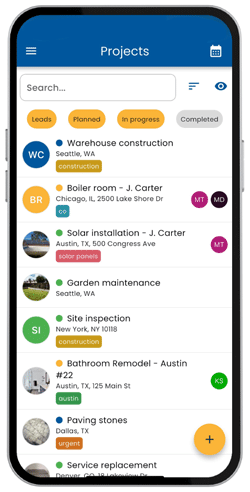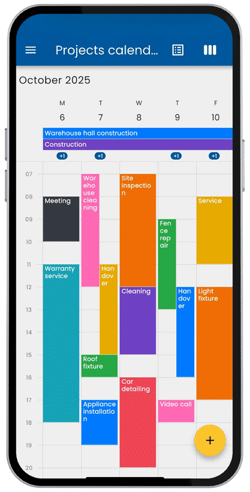
Project and task calendar
Planning and managing deadlines has never been easier thanks to intuitive calendars.

Speci Office and field teams
Replace repeated calls with a clear flow of information. Assign work in the office, give workers mobile access to tasks and keep field updates with the right job.
Watch the videoJob
Assign workers
How it works
Customer instructions stay with the job. Workers check them on site and add information as work progresses. The office can review the history without interrupting another team member.
Customer instructions and the work plan.
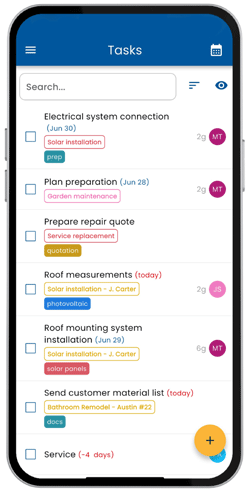
Tasks and job information on a phone.
Photos and notes from the site.
Shared history without rebuilding conversations.
See it in the app
Planning and managing deadlines has never been easier thanks to intuitive calendars.
Manage tasks in your company more easily than ever before with Speci. Assign, monitor, and control work progress in one intuitive module that increases efficiency and saves your time.
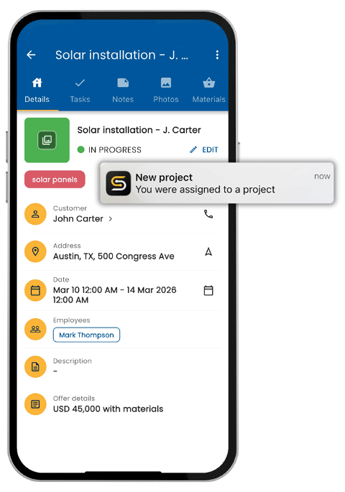
Assign projects and tasks, and send project documentation conveniently from the office straight to your employees' mobile apps.
Tutorial videos
See how Speci can make project management easier for you. We have prepared short tutorial videos showing everything with practical examples.
See how Speci worksOffice ↔ Field team
Improve work organization, track progress, and increase efficiency thanks to all key information gathered in one place.